

Effective communication is crucial for maintaining strong relationships with clients, customers, and club members. In the fast-paced digital world, instant messaging apps like WhatsApp have become indispensable tools for businesses and organizations to stay connected with their communities. With the recent introduction of WhatsApp Communities, managing multiple conversations has never been easier, more organized, or more efficient.
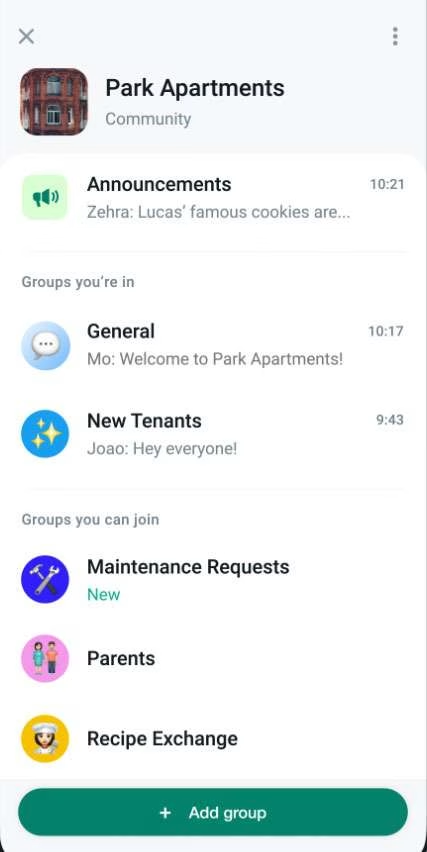

In this post, we’ll explore how you can use WhatsApp Communities to improve communication with your clients or club members, streamline updates, and keep everything in one easily accessible place.
What Are WhatsApp Communities?
WhatsApp Communities allow you to bring multiple WhatsApp groups under a single umbrella, giving you a centralized way to manage various sub-groups while still maintaining the individual group dynamics. Unlike traditional WhatsApp groups, where communication can become overwhelming as the group grows, Communities help you streamline conversations, organize participants, and control the flow of information more effectively.
Whether you are a business looking to connect with clients or an organization managing club members, WhatsApp Communities offer a powerful tool for bringing people together in a structured and organized way.
Why Use WhatsApp Communities?
Here are some key benefits of using WhatsApp Communities to manage communication:
•Centralized Communication: Organize all your groups—whether they are based on service types, membership levels, or interests—into one community for easier management.
•Broadcast Important Announcements: Send important messages to all members through the Announcement Group, ensuring that everyone stays informed without flooding individual chats.
•Segmentation of Members: Create sub-groups for different purposes, such as new clients, premium customers, or specific club activities, and tailor your communication for each group.
•Efficient Communication at Scale: Communities allow up to 5,000 members, making them perfect for businesses or clubs with large audiences, compared to traditional WhatsApp groups which have smaller member limits.
How to Set Up WhatsApp Communities for Your Clients or Members
Step 1: Creating Your WhatsApp Community
First, make sure you’ve updated your WhatsApp app to the latest version that includes Communities.
1. Open WhatsApp and go to the Communities tab (this is usually found in the top left corner).
2. Tap Create a Community.
3.Give your community a name and description. Choose a name that reflects your business or organization, such as “XYZ Client Community” or “ABC Club Members.”
4.Now, you can start adding groups to your community or create new ones.
Step 2: Adding Groups to Your Community
Once your community is created, you can add existing WhatsApp groups or create new ones that fit your communication needs. Here are a few ideas for group segmentation:
•Prospective Clients: Create a group specifically for potential customers to introduce your services or products.
•Current Clients: Have a dedicated group for existing clients where you can offer updates, support, and exclusive offers.
•VIP or Premium Clients: If you offer different service tiers, you can have a special group for your VIP clients, providing personalized services or exclusive perks.
•Club Committees or Activity Groups: For clubs, you can create groups for different activities (e.g., sports, events, workshops) or for specific committees.
Step 3: Sending Announcements
One of the key features of WhatsApp Communities is the Announcement Group, where only admins can send messages. This is ideal for broadcasting important updates, promotions, or events to your entire community without getting lost in the noise of everyday conversations.
To send an announcement:
1.Go to your community’s Announcement Group.
2.Type your message or attach files, such as images, PDFs, or promotional videos.
3.Hit send, and the message will reach all the members in your community.
Step 4: Managing Your Community
Managing a WhatsApp Community is simple and effective. As the admin, you have control over who can join your groups, and you can also assign other members as admins to help manage sub-groups. You can easily moderate discussions by setting guidelines, ensuring conversations stay on topic and professional.
In the settings, you can also adjust group permissions. For example, you might allow open discussions in sub-groups but restrict messaging in the announcement group to admins only.
Best Practices for Using WhatsApp Communities
While WhatsApp Communities are a great tool, keeping the communication clear and organized is key to success. Here are some best practices to follow:
•Keep Announcements Relevant: Use the announcement group only for critical updates. Flooding the group with frequent, non-essential messages can cause members to lose interest.
•Encourage Interaction in Sub-Groups: Allow your clients or members to ask questions, provide feedback, or engage in discussions in the sub-groups. This builds community engagement and loyalty.
•Be Responsive: Ensure you or a team member monitors the groups to answer questions, address concerns, or provide additional information. Clients or members will appreciate quick and helpful responses.
•Set Guidelines: Establish clear communication rules for the community, especially if you have large groups. This ensures discussions remain respectful and productive.
Conclusion
WhatsApp Communities provide an efficient way to keep your clients or members informed, engaged, and organized. Whether you’re running a business, managing club activities, or offering services to different customer segments, Communities help streamline communication and improve the overall experience for everyone involved.
By setting up a WhatsApp Community, you can centralize your communication efforts, tailor your messaging for specific groups, and ensure that important updates reach everyone at once. This makes it an invaluable tool for businesses and organizations looking to create more structured and professional communication channels.
Ready to get started? Create your WhatsApp Community today and watch how it transforms the way you connect with your clients or members!


Leave a Comment